
Installing and Using the Fireball Casino App on Android and iOS
In Poland, the Fireball Casino app comes as an Android APK or an iOS WebView, with a separate Safari home screen option. Android returned to the lobby quickly in my tests, and I could check the same PLN balance on another device after refreshing. Mobile access scores 7.5/10. Placing a bet requires an active connection.

| Parameter | Value |
|---|---|
| Android | Installable APK |
| iOS | WebView container or separate Safari access |
| Mobile browser | Chrome on Android, Safari on iPhone |
| Installation route | App → Download App on Android. Share → Add to Home Screen in Safari |
| Minimum OS | Android 12 (API 31) for the APK, iOS 18.0 for the WebView |
| Versions and builds | Android 1.4.2 (14217), iOS WebView 4.2.9 (42923) |
| Download and storage | 8.16 MB APK download, 25.6 MB installed on the test phone |
| Updates | Install the Android update over the existing copy |
| Permissions | Push notifications are optional. The camera prompt appears when you choose to photograph a document |
| Sign-in | Password in the tested session |
| Account sync | PLN balance and play history visible on iPhone after refresh |
| Test devices | Samsung Galaxy S24 Ultra, iPhone 15 Pro Max and a Polytron Luxia Pro i5 laptop |
| Cashier and document upload | Cashier remained accessible with push off on Android. An existing JPG worked when camera access was declined |
Pros
- Android and iPhone routes are available alongside mobile browser access.
- All six runs in each Android timing series reached the intended screen.
- The Android cashier and games stayed available with push notifications turned off.
- Refreshing the account on iPhone brought up the PLN balance from the same account.
Cons
- On Android you download the APK and confirm the installation yourself.
- The tested builds have minimum OS requirements that exclude older versions.
- Launching the site from the iPhone home screen takes a separate setup in Safari.
- A dropped connection interrupts bet placement until you reconnect.
Featured Fireball Casino games












Where the Fireball Casino App Runs
The Fireball Casino app has an installed Android route and an iPhone WebView route. Chrome on Android and Safari on iPhone give you browser access, and Chrome and Firefox cover the desktop routes I used. The site and app offer Polish and English alongside German and Hungarian. The interface language and account currency are separate choices.
On a phone, the site brings together the lobby, cashier, account controls and support chat. Fireball advertises a platform catalogue of 3,000+ games, and the titles you can open may vary with the device, operating system and provider. Use the games guide to see how the catalogue is organised. The device comparison below uses a specific title and a single Polish account.
Installing on Android and iPhone
On Android, start with the downloadable APK. On iPhone, you can pin the site from Safari and launch it from your home screen. Check the minimum OS for the route you intend to use. The minimum describes compatibility, while the phone and OS listed in the test describe the device behind the observations on this page.
Fireball Casino App Download on Android
Start the Fireball Casino app download from the App area, which has an Android tab and a Download App button. The Fireball Casino Android APK used here was version 1.4.2, build 14217. Its 8.16 MB download is about 7.78 MiB using binary units. The download is free.
- Open App and select the Android tab.
- Tap Download App.
- Open the downloaded APK and confirm installation in the Android installer. The browser’s Install App prompt adds the web app.
- Open the newly added icon and check that the lobby loads.
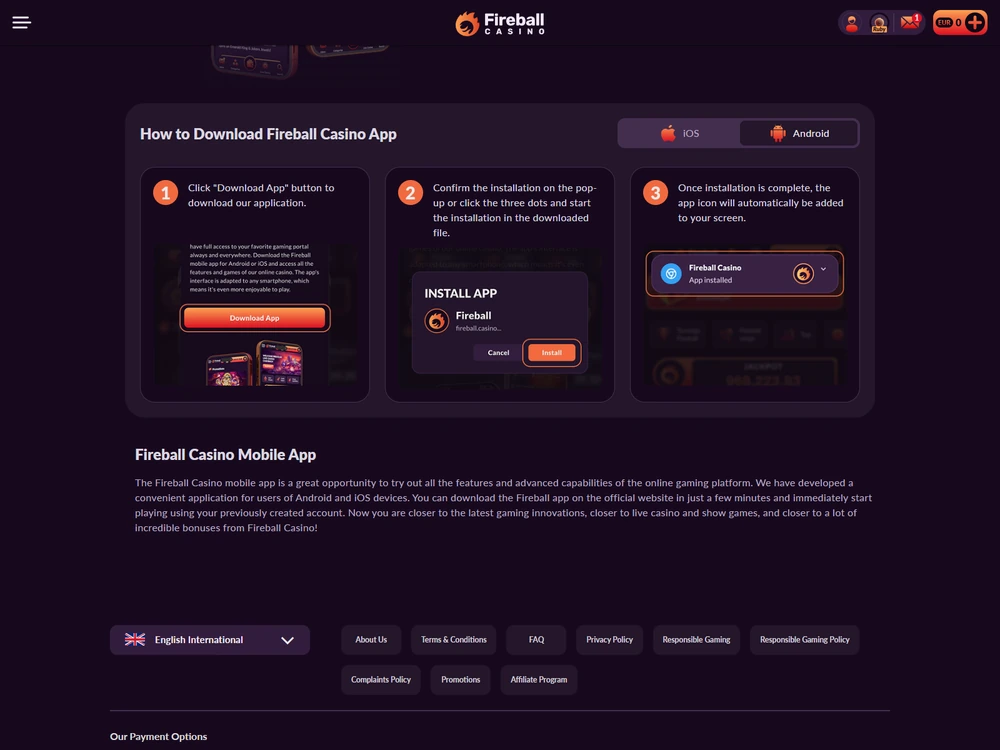
I installed the APK and opened the lobby on a Samsung Galaxy S24 Ultra running Android 15 with One UI 7. The installation took 26.4 seconds. The package for that build is identified as example.fireball.scenario142, and the test ran on arm64-v8a. The application needs a network connection and a touchscreen. The stopwatch series below begins with the installed app ready to open.
Fireball Casino APK Updates and Permissions
Follow these steps to update the Fireball Casino APK.
- Return to App.
- Download the APK.
- Install it over your current copy.
When I updated Android this way, I remained signed in and the account's transaction history stayed intact. You can open the history after installation to check what your account shows.
The notification prompt came up when I opened the notification settings. I declined it and could still open the cashier and games. The message was available in Inbox. If you keep push alerts off, check Inbox for account messages you want to read.
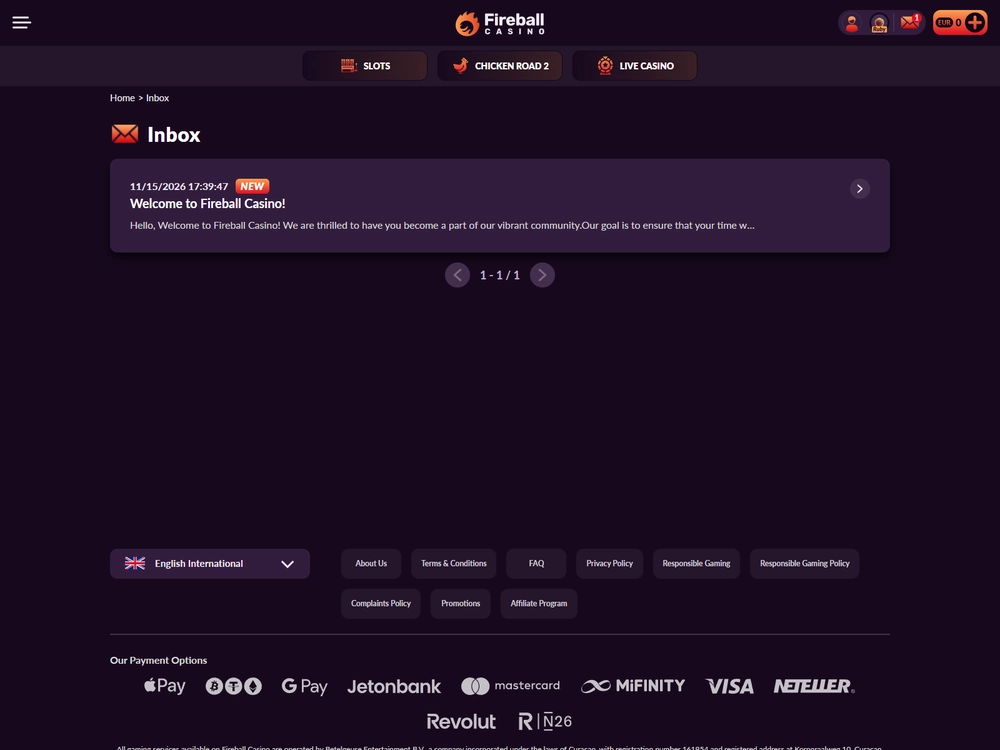
The camera request came up only when I chose to take a photo of a document. After declining it, I selected an existing JPG from the phone and finished the upload step. Contact access played no part in that flow. The Android session used password sign-in. An identity check during document verification is a separate step from signing in.
Adding the Site to Your iPhone Home Screen
Safari can put a Fireball icon on your iPhone home screen. I opened the Fireball Casino iOS WebView version 4.2.9, build 42923, on an iPhone 15 Pro Max running iOS 18.7.2. The tested Safari version was 18.7. The WebView is a web container, and these steps use Safari to create a home screen entry.
- Open the site in Safari.
- Open the menu and tap Share.
- Select Add to Home Screen. Check that Open as Web App is on if that option appears.
- Tap Add, then open the new icon from your home screen.
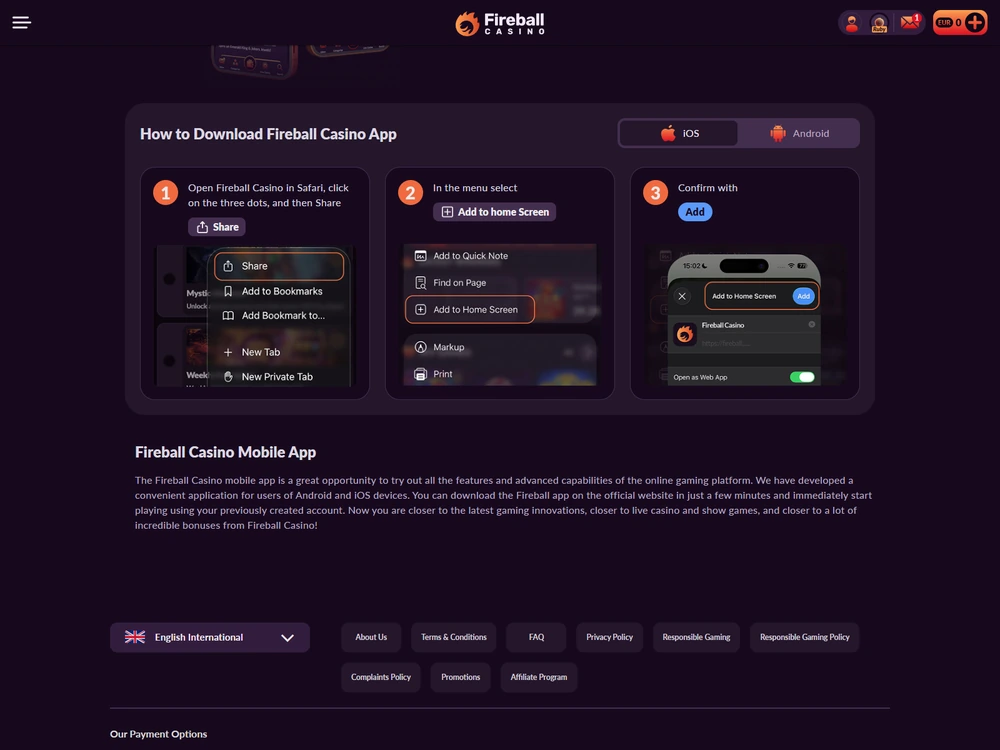
The iOS 18.0 minimum applies to the v4.2.9 WebView. The Safari steps create a browser-based entry point and require no APK file. If you prefer to keep the page in a normal browser tab, open it directly in Safari and skip the home screen setup.
Fireball on mobile
Android APK, iPhone WebView and the Safari web app.
Android Load Times and Network Recovery
On the Samsung, returning to the running app took a median 1.00 second. The median cold start to the interactive lobby was 3.00 seconds, and the median time from tapping The Dog House to reaching its active play button was 4.80 seconds. I measured each action six times on the same Samsung and Orange Polska Wi-Fi connection.
What Each Timing Measures
For the cold runs I stopped the process and left its on-disk cache in place, then timed from the icon tap to the first interactive lobby screen. For the return runs I left the process and cache in memory and timed the return to an interactive screen. For the game runs I began in the open lobby and timed from the card tap to the active play button.
| Action | Six runs (s) | Mean (s) | Median (s) | Minimum (s) | Maximum (s) | Completed |
|---|---|---|---|---|---|---|
| Cold start | 2.80 / 3.20 / 2.70 / 2.80 / 3.90 / 5.40 | 3.4667 | 3.00 | 2.70 | 5.40 | 6/6 |
| Return to the app | 0.80 / 0.75 / 2.05 / 1.15 / 1.75 / 0.85 | 1.2250 | 1.00 | 0.75 | 2.05 | 6/6 |
| Open The Dog House | 6.30 / 4.70 / 4.10 / 6.90 / 4.70 / 4.90 | 5.2667 | 4.80 | 4.10 | 6.90 | 6/6 |
All 18 runs completed. The shortest and longest runs show what the median leaves out. Opening the game ranged from 4.10 to 6.90 seconds even with the lobby already open. The Wi-Fi line measured 143.6 Mbps down and 38.2 Mbps up. A separate Play 5G connection measured 87.4 Mbps down and 19.6 Mbps up. The launch figures in the table are from Wi-Fi.
Data, Storage and Battery Use
In 20 minutes on the Samsung, I measured 77.4 MB of network traffic, with 72.8 MB received and 4.6 MB sent. That works out to 3.87 MB per minute for this session. The 25.6 MB installation and 18.4 MB in app data took up 44.0 MB together after the session. Allow for app data when checking the space available on your phone.
Battery charge moved from 82% to 77%, a drop of five percentage points. The phone's surface warmed from 31.6 to 35.2 °C, an increase of 3.6 °C. Both readings describe one session on the Samsung. A different phone, signal or session can use power and data at a different rate.
What Happens When the Connection Drops
The app displayed a connection message and accepted no new bets while offline. In the interruption test I lost connectivity before sending the bet. When the connection came back, I refreshed the history and it reappeared. I reached the lobby in 4.8 seconds. The balance stayed the same and I sent no second transaction.
- Reconnect to Wi-Fi or mobile data.
- If a game was already underway, sign back in. Fireball’s help guidance says the unfinished game should resume. Refresh the game history and check your balance before retrying an action.
- If the browser still shows an error, clear its cache and cookies, restart it or try another browser. For a persistent error, use the support guide.
Desktop Access and Account Sync
The same Polish PLN account worked across the browser and phone routes used in the test. I used the same Orange Polska Wi-Fi for the APK, iPhone WebView and desktop browser tests. The desktop browser made the side menu, cashier form and payment history easy to inspect. On iPhone, refreshing the account brought the balance into line with the other device.
What the Desktop Browser Shows
I opened the HTTPS site in Chrome and Firefox on the laptop with no separate desktop installation. For the test I used a Polytron Luxia Pro i5 (PL 14M2I5A G65H) with a Core i5-1235U, 16 GB of LPDDR5-4800 memory and a 512 GB PCIe Gen3 SSD. The 14-inch IPS display ran at 1920 × 1200. The desktop ran Windows 11 Home x64 24H2, build 26100.2687, with Chrome 142.0.7444.137 and Firefox 145.0.1. The Android browser route used Chrome 142.0.7444.136.
The desktop side menu showed Slots, Live Casino, Crash Games, Deposit and My Account, and closed after a selection. I opened The Dog House in three actions. I opened search, entered the title and selected card 190128. The similarly named card 290135 is a separate version. The cashier took two actions from the lobby, opening Deposit and selecting a payment method.
At 100% zoom in a 1440 × 900 CSS-pixel window, the main page fit horizontally and the wider payment-history table scrolled within its own area. I also checked the layout at 125%. Tab moved between fields, Enter activated the focused button and Escape closed an information window. A payment required a separate confirmation. Closing the payment-method window preserved the amount in the form, and opening a game created no second deposit.
The payment history showed the 200 PLN withdrawal request, the 0 PLN operator fee and the 200 PLN received on separate lines. When you compare the account across devices, check the balance in My Account and the amount received in the corresponding history entry.
Checking the Same Account on iPhone
After a withdrawal from the Polish account, I refreshed My Account on the iPhone. It showed 17.60 PLN after 3.4 seconds. Refreshing the game history also brought up the saved totals of 248 PLN staked and 235.60 PLN paid out for the matching session. In a separate bonus session both devices showed 100 PLN out of 3,000 PLN counted towards the requirement, or 3.33%.
When I returned to the desktop cashier from a game, it still showed the previous amount. A refresh brought the display back to 17.60 PLN without any new movement of funds. The browser kept the session signed in when I reopened the tab within 20 minutes. Log Out ended the session on that device. After changing my password and ending other sessions separately, I had to sign in again on the iPhone.
100% up to 4,000 PLN
Up to 5,000 free spins with separate award terms
- Offer threshold
- 20 PLN
- Card deposit minimum
- 50 PLN
- Welcome match wagering
- 30× deposit plus bonus
Which Access Route to Use
Use the APK when you want an installed Android app and your phone meets its OS requirement. On iPhone, choose the WebView or add the Safari web app to your home screen. Quick Android returns and refreshed PLN balances and history make device switching practical. Keep a connection when placing a bet.
| Criterion | Weight | Score |
|---|---|---|
| Platform availability and mobile access | 15% | 8.0/10 |
| Download source and installation safety | 15% | 7.0/10 |
| Stability | 20% | 8.0/10 |
| Performance and load speed | 15% | 7.5/10 |
| Feature parity with desktop and web | 15% | 7.0/10 |
| Navigation | 10% | 7.5/10 |
| Sign-in and account security | 10% | 7.0/10 |
| Overall | 100% | 7.5/10 |
The range of access routes, consistent Android completions and visible account history support the 7.5/10. Manual setup and the interruption when the connection drops are the practical drawbacks. Methodology
For background on the service, see the Fireball Casino overview and licence and safety details. See how to access your account
Fireball Casino App for Android and iOS
PDF version of this page
FAQ
Can I use the Android APK on Android 11?
The APK requires Android 12 (API 31) or later. I used Chrome on Android 15 for browser access.
Do I have to allow notifications to use the cashier?
No. When I declined the Android notification prompt, the cashier and games still opened. Account messages were available in Inbox.
Do I need a home screen icon to use Safari?
Open the site directly in Safari if you prefer a browser tab. The home screen icon gives you another way to open the web app.
Does 3.4 seconds describe the withdrawal time?
The 3.4 seconds measure the time from refreshing the iPhone account screen to seeing the updated PLN balance. Bank processing is a separate stage.

Responsible gambling
Play responsibly. Gambling can cause financial and personal harm. Set personal limits. For support, contact GamCare or visit GambleAware. 18+.
Operator and licence
All Fireball Casino gambling services are provided by Betelgeuse Entertainment B.V., registered in Curaçao under number 161954 at Korporaalweg 10, Curaçao. The operator holds Certificate of Operation OGL/2024/1062/0475 issued by the Curaçao Gaming Authority (CGA). Gambling is restricted to adults aged 18 and over.